
Whimsical Garden Party: A Floral Lace Midi Dress for a Summer Event | prompt for traditional look for girl chatgpt instagram
A summer garden party calls for imagery that feels light, romantic, and just a little magical. This prompt builds a portrait around a young girl in a delicate white lace midi dress, twirling among blooms and fairy lights, and it gives you a clear recipe for an enchanting, editorial-style shot.
Whether you are crafting content for Instagram, a bridal-inspired series, or a soft traditional look with a modern twist, this prompt delivers consistent, dreamy results. The scene leans into natural beauty, gentle movement, and ethereal lighting, making it a go-to for anyone who wants a polished yet effortless visual.
What this whimsical garden-party prompt is asking for
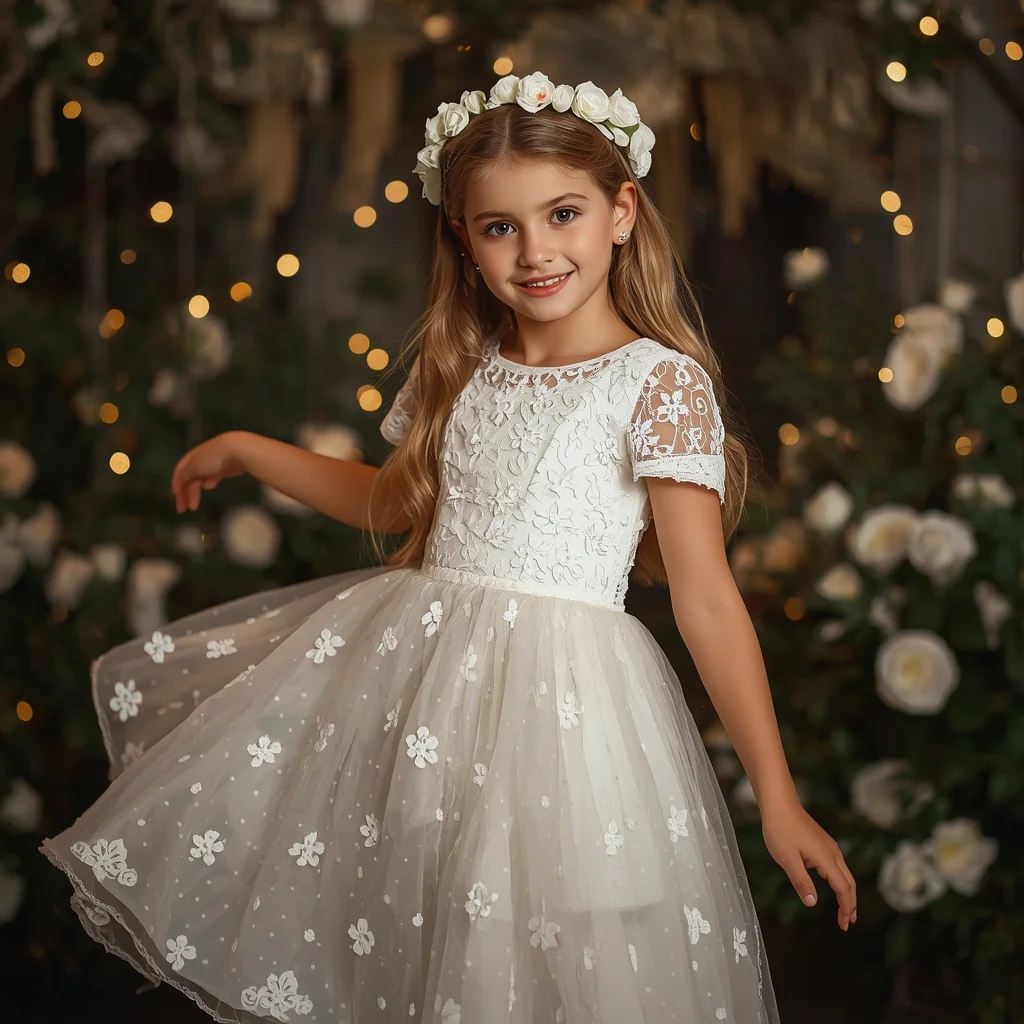
The prompt describes a portrait of a 17-year-old girl at a summer garden party, dressed in a white lace midi dress with floral appliqués and a flower crown. It specifies soft, natural makeup, pearl earrings, and a joyful twirling pose, all set inside a secret garden with glowing fairy lights and white flowers. The lighting is diffused and magical, with a shallow depth of field and a 100mm lens for a polished, high-resolution look.
- White lace midi dress with a fitted bodice, short sleeves, and a flowing A-line skirt
- Small 3D floral appliqués on the dress
- Delicate flower crown made of white roses
- Long, wavy blonde hair
- Soft, natural makeup with shimmer and rosy blush
- Tiny pearl earrings
The atmosphere the prompt builds
The setting is described as a "beautifully lit secret garden filled with glowing fairy lights and blooming white flowers." This isn't a generic outdoor backdrop; the phrase "secret garden" suggests intimacy and discovery, while "glowing fairy lights" add a twilight enchantment that softens every edge. The girl is caught mid-motion, "twirling" in a way that makes the A-line skirt and lace details come alive.
The camera work reinforces the mood. "Soft, diffused magical lighting" and "shallow depth of field" keep the subject sharp against a creamy, out-of-focus background, so the floral appliqués and pearl earrings remain the focal points. Words like "whimsical, romantic, enchanting" at the end of the prompt act as a style anchor, telling the AI exactly which emotional register to hit.
Why this prompt works so well
This prompt succeeds because it layers a specific outfit, a clear action, and a controlled environment without overloading the AI. The dress details, flower crown, and fairy lights give the model concrete textures to render, while the twirling pose adds natural movement that prevents a stiff result. The technical cues—8K, 100mm lens, shallow depth of field—steer the output toward a high-end portrait rather than a casual snapshot, making it ideal for polished social-media content or portfolio pieces.
- The combination of lace, 3D floral appliqués, and pearl earrings gives the AI multiple delicate surfaces to render with precision.
- The twirling action and flowing A-line skirt create a sense of motion that makes the image feel alive and editorial.
- Fairy lights and diffused lighting produce a soft, flattering glow that hides harsh shadows and keeps the focus on the subject's expression and outfit.
Three style directions you can explore with this prompt
Even though the prompt already leans romantic, you can shift its visual language in three distinct directions without rewriting the core scene. Each style stays inside the original prompt's boundaries—same dress, same garden, same twirl—but changes the color grading, texture emphasis, or lighting intensity to create a fresh look.
- Soft editorial: Boost the contrast slightly and add a subtle vignette to mimic a fashion-magazine spread while keeping the fairy-light glow intact.
- Painterly fine art: Emphasize the diffused lighting and floral textures so the image resembles an oil painting with soft brushstrokes and muted pastels.
- Cinematic golden hour: Shift the lighting temperature toward warm gold and add a slight haze to make the secret garden feel like a scene from a period film.
How to generate this portrait step by step
You do not need advanced settings to get a beautiful result, but following a clear sequence helps the AI lock onto the right details. Start by copying the full prompt exactly, then layer in your reference photo and any platform-specific adjustments. Always check the hands, face, and dress details before you call the image finished.
- Copy the prompt. Take the full prompt text and paste it into your chosen tool without trimming or paraphrasing.
- Upload a reference photo. If you want the face to resemble a specific person, upload a clear portrait as an image prompt or use a face-swap feature.
- Set the aspect ratio. Choose a vertical 3:4 or 4:5 ratio for Instagram, or a wider 16:9 crop for a cinematic feel.
- Generate the first batch. Run four variations at once so you can pick the one with the best twirling pose and fabric flow.
- Check the hands. Look closely at the fingers; twirling poses can confuse AI, so discard any image with fused or extra digits.
- Check the face and dress. Make sure the facial expression matches the "joyful" cue and that the 3D floral appliqués are distinct, not blurry smudges.
What kind of reference photo helps the most
A well-chosen reference photo keeps the output consistent with your vision, especially when you want the subject's likeness to stay recognizable. The AI will map the prompt's outfit and lighting onto the facial structure and pose hints you provide, so clarity matters more than artistic style.
- Use a front-facing or slight three-quarter portrait with even, natural light and no heavy shadows on the face.
- Avoid busy backgrounds; a plain wall or soft outdoor blur lets the AI focus on the facial features without distraction.
- If you want the twirling motion to look natural, include a reference where the person's body is slightly turned or mid-step rather than standing rigidly.
Tools that bring this garden-party portrait to life
Different AI image generators handle lace textures, floral details, and diffuse lighting with varying levels of realism. The table below compares four popular options so you can choose the one that matches your desired output quality and the specific details of this prompt, such as the 3D floral appliqués.
| Tool | Access | Typical realism | Useful here for |
|---|---|---|---|
| ChatGPT | Free and paid tiers | Good, with a slightly soft finish | Rendering the fairy-light glow and keeping the white lace dress from looking overexposed |
| Google Gemini | Free and paid tiers | Good, often with vibrant color | Capturing the rosy blush and shimmer makeup without making the skin look plastic |
| Leonardo AI | Free and paid tiers | High, with strong texture detail | Nailing the 3D floral appliqués and the delicate weave of the lace midi dress |
| Midjourney | Paid only | Very high, cinematic lighting | Producing the shallow depth of field and the ethereal, romantic atmosphere of the secret garden |
Three tips to make the lace dress and garden glow
Small tweaks to your prompt or generation settings can fix common flat-looking outputs and bring out the textures that make this image special. Focus on the materials already named in the prompt—white lace, pearl earrings, and white roses—and guide the AI to treat them as focal points.
- Add the phrase "intricate lace pattern visible" if the white lace midi dress comes out looking like smooth cotton instead of showing the openwork texture.
- Specify "individual pearl highlights" when the tiny pearl earrings appear as flat white dots, so the AI adds a subtle reflective sheen to each one.
- Use "crisp white rose petals with visible veins" if the flower crown or garden blooms render as soft blobs, which helps the AI define the white roses sharply against the diffused background.
Common issues and how to fix them
Even a detailed prompt can produce images with small but distracting flaws. The table below lists the most frequent problems this garden-party prompt creates and the exact change to make in your prompt or settings to correct them.
| Issue | What to change |
|---|---|
| The lace dress looks solid white with no texture | Add "fine lace fabric with visible eyelet holes" to the prompt and increase the weight of the dress description |
| The fairy lights appear as harsh, blown-out blobs | Replace "glowing fairy lights" with "tiny warm-toned bokeh fairy lights" and lower the prompt's lighting intensity if your tool allows |
| The twirling pose makes the hands look distorted | Add "hands relaxed and naturally positioned, fingers visible" and use a negative prompt for "extra fingers, fused hands" |
| The flower crown merges into the hair | Add "distinct individual white roses separated by small green leaves" so the crown reads as a separate accessory |
Frequently Asked Questions
Can I change the dress color and still keep the whimsical garden-party feel?
Yes, but you will need to adjust the flower crown and lighting to match. Swap "white lace midi dress" for "blush pink lace midi dress" and change "white roses" to "cream roses" so the palette stays cohesive. Keep the fairy lights and diffused lighting to preserve the romantic mood.
What if I want the portrait to look more like a candid shot than a posed editorial?
Replace "her pose is graceful and joyful, twirling" with "candid moment, caught mid-laugh while spinning" and add "slightly motion-blurred skirt edge" to suggest spontaneous movement. Lower the 8K resolution cue to "high quality" if the result looks too staged.
How do I make the 3D floral appliqués stand out more?
Add "macro detail on floral appliqués, raised petals with subtle shadows" to the prompt. If your tool supports it, increase the detail weight on the dress description, and generate at a higher resolution so the small textures render clearly.
Conclusion
This prompt gives you a complete blueprint for a soft, romantic garden-party portrait that feels both timeless and modern. The white lace midi dress, flower crown, and fairy lights work together to create an image that is easy to style across different AI tools, and the detailed scene description leaves just enough room for you to add your own creative spin. Whether you keep it exactly as written or adjust the colors and pose, the result will carry that whimsical, enchanting quality that makes summer-event photos stand out.
When you have the final image, open it in your preferred editor and gently enhance the shimmer on the makeup and the pearl earring highlights—small tweaks that make a photo you have every right to edit feel truly yours.


